
What to Consider When Choosing a Security Camera?
When choosing a security camera, megapixels, night vision distance, and price alone are not sufficient. Camera resolution, lens and field of view, DORI/PPM analysis, WDR, low-light performance, recording capacity, artificial intelligence features, and cybersecurity must be evaluated together. We examine the technical criteria for selecting the right CCTV and IP camera.
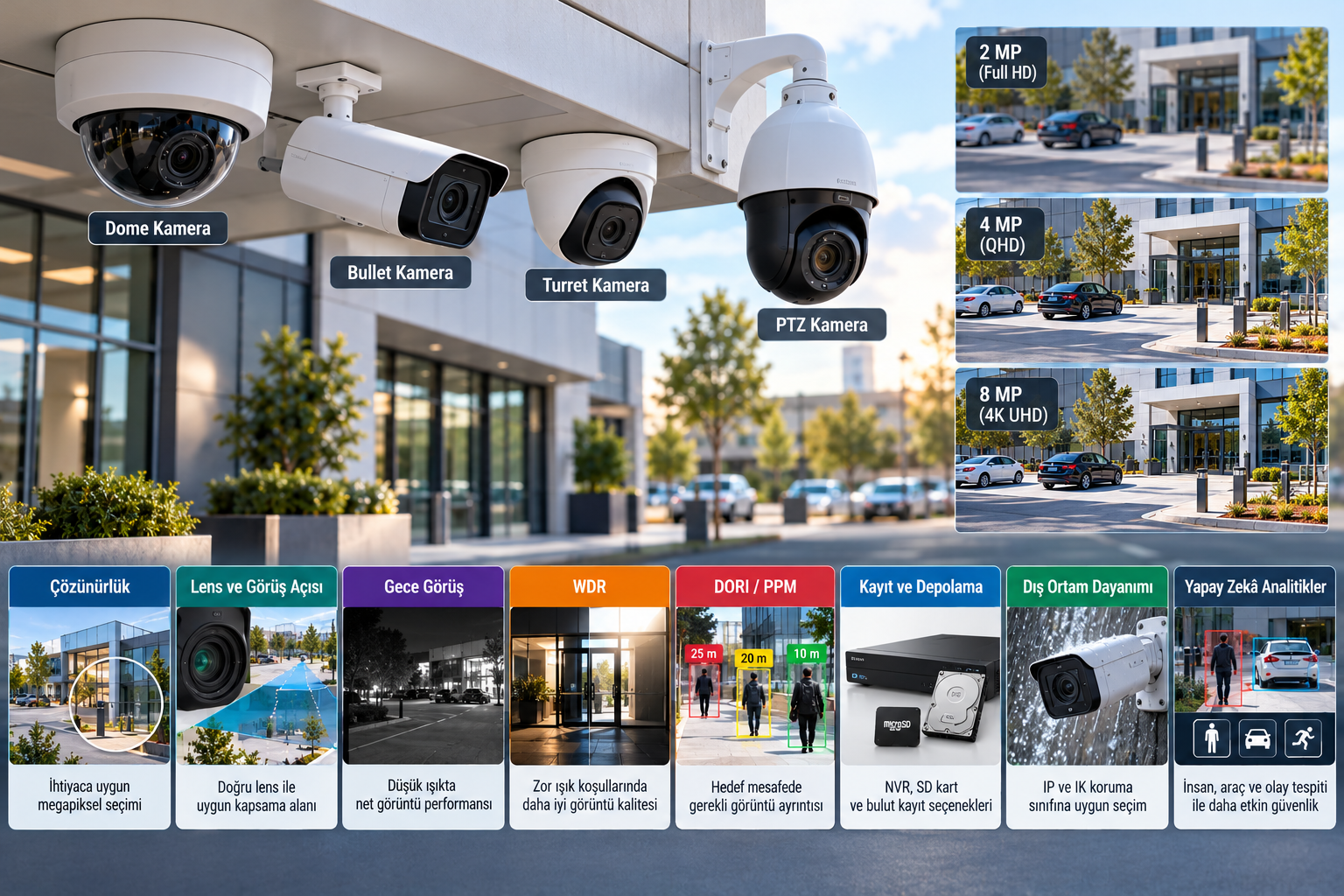
One of the most common mistakes made when purchasing a security camera is basing the selection solely on megapixel value, night vision distance, or product price. However, a reliable CCTV system depends on placing the right camera in the right location for the right purpose.
For example, a wide-angle camera with 8-megapixel resolution can provide a general overview of a large parking lot. However, it may not be able to display the face of a person at a distant point in the parking lot with sufficient detail. In contrast, a lower-resolution camera with an appropriate lens can provide more image detail at a specific entry point.
Similarly, a camera with powerful night vision capabilities may not clearly display moving individuals or vehicle license plates under night conditions.
Therefore, the correct security camera selection requires a combined evaluation of camera resolution, image sensor, lens, field of view, low-light performance, recording infrastructure, and intended use.
So, what technical specifications should be considered when choosing a security camera? Which criteria should be prioritized for a home, workplace, factory, or a large-scale security project?
1. Determine the Purpose of the Security Camera
The first step in camera selection is to define the area to be protected and the expected function of the camera.
A camera used for perimeter security of a factory does not necessarily need to have the same features as a camera used to obtain detailed images at a store entrance.
For example:
Home and residential security: Entrance doors, gardens, parking lots, and common areas.
Store and retail: Store entrances, cash register areas, and high-security risk zones.
Factory and industrial facilities: Perimeter security, production areas, loading docks, and critical equipment.
Sites and collective housing: Main entrances, driveways, parking lots, and common use areas.
Warehouse and logistics: Loading ramps, product movements, and large storage areas.
Banks and financial institutions: Entrances, transaction points, and areas requiring high security.
In each of these applications, viewing distance, lighting conditions, camera placement, and required image detail differ.
The fundamental question is not how many megapixels the camera has, but what information it needs to provide for security purposes.
2. Camera Resolution: How Many Megapixels Are Enough?
Camera resolution refers to the number of pixels in the horizontal and vertical directions of an image.
Commonly used security camera resolutions include 2 MP, 4 MP, 5 MP, and 8 MP options.
For example:
| Camera resolution | Example image size | General assessment |
|---|---|---|
| 2 MP | 1920 × 1080 | Basic security and general monitoring |
| Approx. 4 MP | 2560 × 1440 | More image detail |
| 5 MP | Varies by model | Increased detail and different aspect ratios |
| 8 MP (4K UHD) | 3840 × 2160 | High total pixel count for large areas |
High resolution can provide more detail under suitable conditions. However, increasing the pixel count on the same sensor size does not always mean better low-light performance.
Image quality is also affected by sensor technology, lens, light quantity, image processing, and compression features.
Therefore, it should not be assumed that an 8 MP camera will outperform a 4 MP camera in every usage scenario.
3. Why Are Lens Selection and Field of View Important?
The lens is one of the fundamental components that determine which area and at what magnification the security camera will view.
Fixed-focal, varifocal, and motorized varifocal lenses are commonly used in security cameras.
Fixed Lens Cameras
Fixed lens cameras have a specific focal length.
For example, lens options such as 2.8 mm or 4 mm may be available.
These cameras can be preferred in applications where the field of view requirement can be determined in advance.
Varifocal Lens Cameras
Varifocal lenses allow the focal length to be adjusted within a certain range.
For example, a lens with a focal length range of 2.8–12 mm can create different horizontal fields of view with an appropriate sensor.
This feature facilitates precise framing of the designated area during reconnaissance.
Motorized Varifocal Lens Cameras
In motorized varifocal lenses, zooming and, in some models, focus adjustment can be performed remotely.
This can provide ease of installation and adjustment, especially for cameras placed in hard-to-reach locations.
However, the millimeter value of the lens alone does not determine the field of view. The physical dimensions of the image sensor must also be considered.
A wide-angle camera shows a larger area; however, at the same resolution, the detail of distant objects in the image may decrease.
4. DORI Analysis and PPM Calculation Should Be Performed
In professional security camera selection, the image detail requirement should be evaluated numerically.
One method used for this purpose is pixel density calculation.
PPM (Pixels Per Meter) refers to the number of pixels per horizontal width of the image at a certain distance.
PPM = Horizontal image resolution / Displayed area width (meters)
For example, if a camera with 3840 horizontal pixels displays an area 16 meters wide at the target distance:
PPM = 3840 / 16 = 240 PPM
This value indicates the approximate horizontal pixel density at that distance.
What is DORI?
DORI refers to the four operational imaging levels used in the former IEC 62676-4:2014 approach:
Detection: Detecting the presence of an object.
Observation: Observing general characteristics.
Recognition: Detail sufficient for recognizing a known person.
Identification: Image detail sufficient for identity determination.
In the classic DORI model, reference values of 25, approximately 63, 125, and 250 PPM were used, respectively.
However, the second edition of the IEC 62676-4 standard, published in 2025, has updated the image detail classification with a new seven-level approach.
The new classification includes Overview, Outline, Discern, Perceive, Characterize, Validate, and Scrutinize levels.
Therefore, in new camera projects, instead of using only old DORI values, the applicable current standard and the imaging purpose of the project should be evaluated together.
Furthermore, pixel density alone does not guarantee identity determination or the accuracy of artificial intelligence algorithms.
5. Night Vision and Low-Light Performance Should Be Examined
A significant portion of security cameras operate in night and low-light conditions.
Therefore, evaluating only daytime images is not sufficient for camera selection.
IR Night Vision
IR (Infrared) technology enables image acquisition in low-light conditions using infrared illumination.
Manufacturer technical documents may specify IR distances such as 20, 30, 50, or more meters.
However, the stated IR distance does not mean that a person's face or vehicle license plate can be reliably viewed at that distance.
Detection quality is affected by target distance, IR light distribution, reflective surfaces, weather conditions, and image settings.
Color Night Vision
Some cameras use sensor and lens technologies to obtain color images in low light.
However, color night vision performance depends on ambient light, supplementary lighting, and camera features.
It should not be assumed that true color images can be obtained in a completely dark environment without additional visible light.
Motion Blur
In low light, the camera may extend its exposure time.
In this case, while stationary objects in the image appear clear, moving individuals may become blurred.
Therefore, when evaluating night performance, not only static image samples but also images of moving people and vehicles should be tested.
6. Pay Attention to WDR and Light Balance
WDR (Wide Dynamic Range) refers to technologies that help better represent details in very bright and very dark areas simultaneously present in an image.
It is particularly important in the following areas:
Building entrances exposed to sunlight.
Offices with glass facades.
Parking lot entrances and exits.
Storefronts.
Security points with intense backlighting.
For example, a camera positioned in a dark interior while there is strong daylight outside may display the face of an entering person with insufficient detail.
Appropriate WDR technology can improve image quality in such scenes.
However, WDR values declared by manufacturers do not always solely reflect actual field performance.
When selecting a camera, real image samples with WDR enabled and moving target performance should be evaluated.
7. IP Camera or Analog HD Camera?
Security camera systems include IP-based solutions and HD analog solutions using coaxial cable.
The correct choice depends on the existing cabling infrastructure, integration requirements, and system size.
| Criterion | IP Camera | HD Analog Camera |
|---|---|---|
| Connection infrastructure | Ethernet/IP network | Typically coaxial cable |
| Recording architecture | NVR, VMS, edge or other supported solutions | Compatible DVR/XVR |
| Video analytics | Wide range of product and application options | Depends on compatible product and recorder |
| Remote management | Depends on network and software capabilities | Depends on DVR/XVR infrastructure |
| Expansion | Depends on network capacity and system architecture | Depends on recorder and channel capacity |
| Using existing cabling | Network compatibility required | Can be advantageous with coaxial infrastructure |
In new and multi-point projects, IP camera systems can provide flexibility in terms of network infrastructure and software integrations.
However, in some modernization projects using existing coaxial infrastructure, HD analog solutions can be an economical alternative.
Technology selection should be made based on existing infrastructure, required functions, and total cost.
8. Camera Type: Dome, Bullet, Turret, or PTZ?
The camera body type should not be evaluated solely in terms of aesthetics or ease of installation.
Dome Camera
Has a dome-shaped body. Can be used indoors and in suitable outdoor models.
Some dome cameras are offered with impact-resistant body features.
However, dirt, scratches, or infrared reflections on the dome surface can affect the image under certain conditions.
Bullet Camera
Typically has a cylindrical body.
Models suitable for wall or pole mounting are available. Commonly used in outdoor and perimeter security applications.
Turret Camera
Has a body, often with a spherical head, where the camera module can be directed.
In models without a dome glass, some IR reflection issues may be reduced.
PTZ Camera
PTZ is an abbreviation for Pan-Tilt-Zoom.
The camera can be moved horizontally and vertically; optical zoom can be performed.
It can provide advantages in monitoring large areas by an operator and focusing on specific points.
However, a PTZ camera looking in a specific direction does not mean that other areas continue to be monitored simultaneously.
Therefore, in critical security areas, PTZ cameras should not be considered an automatic alternative to necessary fixed cameras.
9. IP and IK Protection Classes for Outdoor Cameras
Outdoor security cameras are exposed to effects such as temperature, rain, dust, humidity, and in some applications, impact.
Therefore, the environmental durability of the product should be examined.
IP Protection Class
IP protection class refers to the device's enclosure properties against solid objects and water.
For example, IP66 or IP67 class products meet protection requirements against dust and water under specific test conditions.
However, these classes do not indicate that the product is suitable for all environmental conditions or continuous underwater operation.
IK Impact Resistance
IK classification indicates the level of resistance of the device enclosure to mechanical impacts.
An appropriate IK class can be considered in areas prone to vandalism.
When selecting an outdoor camera, operating temperature, humidity, corrosion risk, mounting equipment, and, if necessary, special enclosure features should also be evaluated.
10. Artificial Intelligence and Video Analytics Features
Modern security cameras are not limited to just generating images.
With appropriate hardware and software infrastructure, various video analytic functions can be supported.
Example applications:
Human and vehicle classification.
Line crossing and virtual boundary detection.
Detection of entry or exit from a defined zone.
Object left or removed analysis.
People counting and visitor density analysis.
License plate recognition under specific conditions.
Special video analytics suitable for the application.
However, the presence of artificial intelligence features does not mean high accuracy will be achieved in all applications.
For example, people counting, license plate recognition, and perimeter violation detection have different algorithm and camera placement requirements.
When selecting a camera, in addition to the analytics supported by the manufacturer, false alarm rate, detection conditions, mounting criteria, and integration possibilities should also be examined.
Furthermore, when biometric analysis and personal data processing are involved, relevant legal requirements should be evaluated.
11. Recording Capacity and Storage Duration Should Be Calculated
Camera selection should not be made independently of the recording infrastructure.
How long images will be stored and at what resolution they will be recorded affects the system's capacity and cost.
Key parameters affecting recording duration:
Number of cameras.
Average bitrate per camera.
H.264, H.265, or other supported compression technologies.
Frames per second (FPS).
Continuous or event-based recording method.
Targeted storage duration.
Recorder's disk capacity and architecture.
Example Recording Capacity Calculation
Theoretical daily recording amount for a camera continuously recording at an average bitrate of 4 Mbps:
4 Mbps × 10.8 = 43.2 GB/day
If eight cameras with the same characteristics record continuously for 30 days:
43.2 × 8 × 30 = 10,368 GB
Approximately 10.4 TB of theoretical recording data is generated.
This calculation does not include factors such as file system areas, other system data, capacity reserve, and variable bitrate.
Therefore, additional buffer should be left when determining actual storage capacity.
The duration for which recordings are stored should be evaluated not only technically but also in terms of personal data protection and, if applicable, sectoral regulations.
For more detailed information, GüvenlikOnline's article titled Security Camera System Recording Duration can be reviewed.
12. NVR, SD Card, and Cloud Recording Options
Security cameras can be used with different storage systems.
NVR: Enables central recording and management of images from IP cameras.
SD Card / Edge Storage: Allows images to be stored on the memory card within compatible cameras.
Cloud Recording: Enables images to be transferred and stored on remote servers with appropriate service infrastructure.
These solutions have their respective advantages and limitations.
For example, in case of central recording system failure or network connection loss, in-camera recording can provide additional protection in suitable systems.
However, the presence of an SD card in the camera does not mean that recordings are automatically backed up.
In critical security projects, it should be evaluated whether the recording system is dependent on a single point of failure.
13. PoE and Network Infrastructure Must Be Compatible
In IP camera systems, PoE (Power over Ethernet) technology is frequently used for power and data connection.
PoE allows compatible cameras and network equipment to transmit power and data over a single Ethernet connection.
However, not all PoE devices have the same power capacity.
Cameras with motorized lenses, IR illumination, heaters, or PTZ functions, in particular, may have higher power requirements.
The following points should be examined when selecting a camera:
Supported PoE standard and power requirement.
Total PoE power budget of the network switch.
Cable type, quality, and connection length.
Network bandwidth.
Network segmentation and security.
Uninterruptible power supply requirement.
The continuous transmission and recording of images are as important as the camera's operation.
14. ONVIF Compliance and System Integration
Standard interfaces are important for the interoperability of IP cameras from different brands with recording or video management software.
ONVIF is an international industry initiative that supports interoperability among IP-based physical security products.
The following profiles can be particularly evaluated when selecting a camera:
ONVIF Profile T: Advanced video streaming and related viewing functions.
ONVIF Profile G: Recording and retrieval of recordings on compatible devices.
ONVIF Profile M: Metadata and event interfaces for analytic applications.
However, stating that a device supports ONVIF does not mean that all functions will work seamlessly between different brands.
The product must have an official conformity registration within the scope of the relevant profile, and its compatibility with the NVR/VMS software to be used must be verified.
Especially artificial intelligence analytics, special alarm functions, and manufacturer-specific management features should be tested separately.
15. Cybersecurity and KVKK Requirements
IP security cameras are electronic devices with network connectivity.
Therefore, cybersecurity features should also be evaluated when selecting a camera.
Important criteria include:
Secure user authentication.
Separate definition of authorization levels.
Regular software and security updates.
Secure communication methods.
Log records and event tracking.
Ability to disable unnecessary services.
Manufacturer's security advisories and support policy.
Additionally, camera systems should be operated in controlled network structures as much as possible, and unnecessary direct internet access should be limited.
If the processing of images containing personal data is involved, Law No. 6698 on the Protection of Personal Data (KVKK) must also be considered.
The Personal Data Protection Authority emphasizes the importance of the principles of purpose limitation, proportionality, informed consent, and recording security in the use of camera systems.
Areas with high privacy, such as restrooms, changing rooms, and similar locations, are not suitable for camera placement.
Audio recording, facial recognition, or similar additional data processing functions may also require separate legal evaluation.
For more information on protecting camera systems against unauthorized access, GüvenlikOnline's content titled Could Someone Be Watching Your Home and Workplace? can be reviewed.
16. Warranty, Technical Service, and Total Cost of Ownership
Focusing solely on the initial purchase cost when selecting a camera can lead to additional expenses in the long run.
Especially in large-scale projects, the following costs should be evaluated together:
Camera and lens costs.
Installation and cabling.
PoE switches and network equipment.
Recording devices and storage infrastructure.
Video management software and licenses.
Energy consumption.
Spare parts and maintenance.
Software updates.
Technical service and warranty conditions.
The manufacturer's long-term product support and the technical competence of the system integrator are also important parts of the purchasing decision.
A low initial investment cost does not always mean a low total cost of ownership.
Which Camera Features Are Prioritized for Which Application Area?
The table below summarizes the technical criteria that can be prioritized in different projects.
| Application area | Prioritized criteria |
|---|---|
| Home and residential | Ease of use, night vision, recording security, privacy |
| Store and cash register | Image detail, WDR, lens, recording quality |
| Factory perimeter | Detection distance, DORI/PPM, outdoor durability |
| Site and parking lot | Field of view, night performance, appropriate camera placement |
| Warehouse and logistics | Coverage, image detail, recording duration |
| Vehicle entry-exit | License plate viewing purpose, exposure, lens and illumination |
| Large campus | Centralized management, network capacity, integration, maintenance |
The table is not a definitive camera model or performance recommendation. Final camera selection should be made based on site survey, risk analysis, and verified product specifications.
Common Mistakes in Security Camera Selection
Common mistakes encountered in camera purchasing and project planning processes include:
Basing camera selection solely on megapixel value.
Not evaluating the lens and field of view.
Accepting the manufacturer's night vision distance as definitive image performance.
Not calculating camera mounting height and target distance.
Not evaluating the required image detail with DORI/PPM calculation.
Determining recording capacity solely based on disk size.
Not testing camera and NVR/VMS compatibility.
Not verifying the accuracy of artificial intelligence features under field conditions.
Ignoring software updates and cybersecurity.
Not creating an post-installation image verification and maintenance plan.
A significant portion of these mistakes can be prevented with proper site survey and technical project planning.
Technical Checklist for Security Camera Selection
Before purchasing or project planning, the following questions should be answered:
Has the camera's security and viewing purpose been determined?
Have the dimensions of the area to be protected and target distances been determined?
Has the camera resolution and lens combination been evaluated?
Has DORI/PPM or applicable current image detail calculation been performed?
Has performance in night and low-light conditions been examined?
Has WDR and moving target image quality been verified?
Is the outdoor protection class suitable?
Do the video analytic features meet the need?
Is the camera compatible with the recording system?
Has storage capacity and retention period been calculated?
Is the capacity of the PoE and network infrastructure sufficient?
Have ONVIF or manufacturer integrations been verified?
Have cybersecurity and KVKK requirements been evaluated?
Have warranty, technical service, and maintenance conditions been examined?
Are post-installation field verification tests planned?
This checklist supports the technical selection process; it does not replace an application project or product conformity certificate.
Frequently Asked Questions
How many megapixels should a security camera be?
The required resolution depends on which area and at what level of detail the camera needs to view. 2 MP, 4 MP, or 8 MP options may be suitable for different projects. The decision should be made in conjunction with the lens and target distance.
Is a 4 MP or 8 MP camera better?
An 8 MP camera has a higher total pixel count. However, due to low-light performance, optical quality, field of view, and recording settings, it may not yield better results in every application.
What is the best lens mm for a security camera?
There is no single ideal lens value. The appropriate focal length is determined by the sensor size, the area to be viewed, the target distance, and the expected image detail.
What should be the night vision distance of a security camera?
The required distance should be chosen according to the characteristics of the area to be protected. The IR illumination distance stated by the manufacturer does not guarantee that a person's identity can be determined at the same distance.
Should I choose a Wi-Fi camera or a wired camera?
Wired IP cameras can offer advantages in connection stability and power management with appropriate infrastructure. Wi-Fi cameras can be practical in some applications where cabling is difficult. In both methods, network reliability and security should be evaluated.
Is artificial intelligence necessary in a security camera?
It is not necessary for every camera. AI analytics can be beneficial in applications where automatic detection of specific objects or events is desired. However, algorithm performance must be verified under real field conditions.
What is the most important feature when buying a security camera?
The most important feature is that the camera meets the security purpose. The right camera should be able to reliably provide sufficient image detail at the required point, under appropriate light and environmental conditions.
Conclusion: The Best Security Camera is the One That Meets the Need
Choosing a security camera is not just about buying a product with high megapixel values or advanced features.
The correct security camera should be selected by evaluating the viewing purpose, lens, resolution, night performance, DORI/PPM analysis, recording infrastructure, and system security together.
Especially in professional CCTV projects, site surveys, accurate technical calculations, appropriate product selection, and post-installation image verification are of great importance.
The goal of a successful security project is not to install the maximum number of cameras possible, but to obtain the required image detail reliably and sustainably at the right point.