
AI-Powered Camera Systems in Restaurants: Security, Kitchen Hygiene and Customer Analytics
How do AI-powered camera systems work in restaurants? We examine AI video analytics, kitchen hygiene, cash-register security, people counting, table-occupancy analysis, queue management, security across multi-branch restaurants, and KVKK requirements.
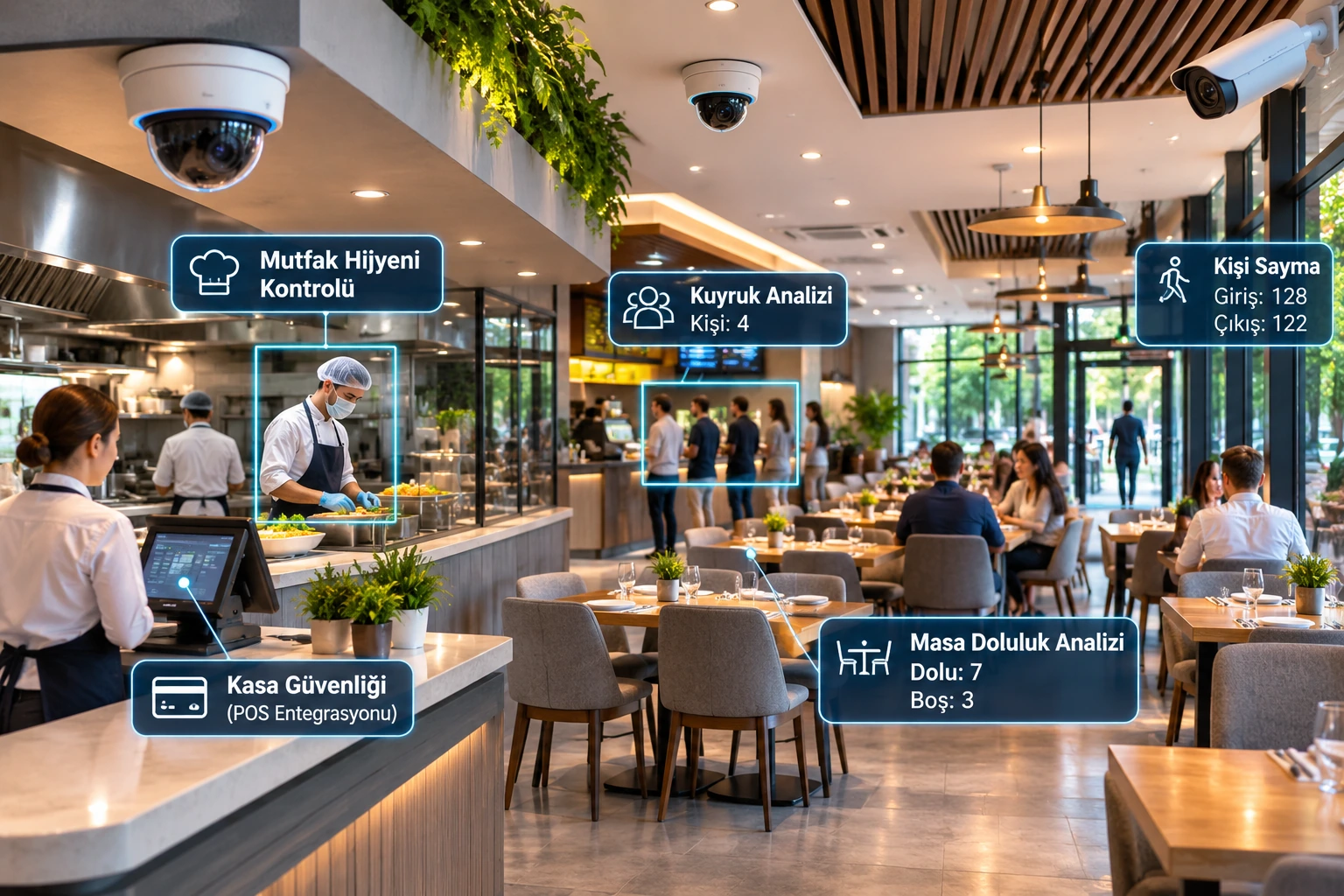
Restaurant security camera systems are no longer used solely to capture theft incidents and review past footage. With suitable infrastructure and algorithms, AI-powered video analytics can also help restaurants analyze security, customer traffic, and certain operational processes.
While traditional CCTV systems provide viewing and recording, AI-powered camera systems (AI CCTV) can offer additional features such as human detection, people counting, queue-length estimation, restricted-area breach detection, and checks for certain visual hygiene rules.
These technologies have different use cases, particularly in restaurant chains, quick-service restaurants, cafés, hotel restaurants, and takeaway businesses.
However, the fact that a security camera is AI-powered does not mean it can comprehensively monitor kitchen hygiene, measure customer satisfaction, or reliably assess all employee behavior.
Successful deployment requires considering camera placement, suitable analytics algorithms, real-world testing, data security, and personal-data protection together.
What Is an AI-Powered Camera System in Restaurants?
An AI-powered restaurant camera system is a hardware and software solution that analyzes footage from security cameras using computer-vision algorithms.
In these systems, analysis can be performed directly on the IP camera, on an AI-enabled NVR device, or on a centralized analytics server.
The main uses in restaurants include:
Security at restaurant entrances and exits
Counting customer entries and exits
Cash-register and payment-point security
Queue-length and waiting-area analysis
Estimating occupancy of tables and seating areas
Detecting entry into controlled kitchen and storage areas
Visual checks of specific hygiene equipment
Detecting obstructions in front of emergency exits
Detecting movement outside business hours
Centralized security management across multiple branches
Not all these functions are available on a standard AI camera. Some applications require specialized software, an additional license, different camera placement, or specially trained algorithms.
How Do AI Camera Systems Work in Restaurants?
1. Image Capture
IP cameras at designated points in the restaurant produce video.
2. AI Analysis
AI algorithms analyze people, specific objects, or movement patterns in the footage.
3. Setting Analysis Rules
For example, an alarm rule can be set to detect a person at the kitchen entrance after the restaurant closes.
4. Generating Events and Data
Depending on the use case, the system can generate a security alarm or numerical analytics data.
5. Centralized Management
With suitable software infrastructure, events from different cameras and restaurant branches can be viewed on a single platform.
6. Field Validation
Detection accuracy, false alarms, and operational benefits are tested under real restaurant conditions.
Uses of AI Camera Systems in Restaurants
Security at Restaurant Entrances and Exits
Restaurant entrances are areas where customer and staff movement is concentrated.
In specific scenarios, AI cameras can perform human detection, virtual line-crossing detection, and detection of movement outside business hours.
This makes it possible to generate automatic security alerts for certain movements that occur while the business is closed.
However, the presence of a person in the footage does not, by itself, show that the person is unauthorized. Assessing authorization may require working hours, access-control records, or other security data.
Cash-Register and POS Security
Restaurant cash registers are important security points where cash and electronic payments are handled.
Camera systems can help with reviewing incidents around cash registers when necessary.
With a suitable POS-video integration, transaction times can be linked to the relevant video recordings.
For example, a voided transaction or refund record can help authorized staff find the footage from the relevant time period.
However, an unusual transaction in the POS system is not, on its own, evidence of theft or employee misconduct.
Care should also be taken to ensure that cameras do not record customers entering their PINs or sensitive payment information.
Kitchen-Entrance and Restricted-Area Security
Restaurant kitchens, storage rooms, and certain staff-only areas may require controlled access.
AI cameras can perform human detection or entry-breach analysis in designated zones.
However, appropriate access controls and operational procedures may be needed to determine whether a person is actually authorized.
Restaurant Kitchen Hygiene Monitoring with AI
Compliance with hygiene rules in restaurant kitchens is important for food safety.
Some specialized computer-vision systems are being developed to support monitoring of specific visual hygiene procedures.
Detecting Hairnets and Protective Clothing
Suitably trained algorithms can visually assess whether employees are wearing specific protective equipment.
For example:
Hairnet
Apron
Mask
Specific workwear
Gloves in appropriate use cases
can be detected.
However, seeing a glove in the footage does not show that it is clean.
Analysis of Handwashing Procedures
Specialized systems can attempt to assess specific movements or steps at handwashing stations.
Nevertheless, cameras cannot confirm that hands are microbiologically clean.
Monitoring Food-Preparation Areas
Entry into specific areas, visible use of protective equipment, or defined object-related events can be analyzed.
However, footage cannot definitively establish that food is safe, has been kept at the right temperature, or is free of allergen contamination.
AI camera systems do not replace HACCP practices, food-safety inspections, or required temperature or hygiene checks.
People-Counting Systems in Restaurants
Measuring customer traffic can be an important source of data for restaurant operational planning.
AI-powered people-counting systems can count people passing through entrances and exits under certain conditions.
This data can help restaurant managers with:
Daily visitor traffic
Hourly customer traffic
Identifying peak hours
Weekday and weekend comparisons
Analyzing visitor traffic across branches
Changes in visits during promotional periods
However, people-counting data does not directly show sales volume or customer satisfaction.
Combining People Counts with Sales Data
When restaurant entrance traffic and POS data are combined appropriately, certain operational indicators can be generated.
For example, the number of transactions in a given period can be compared with the number of visitors.
However, since one transaction may cover multiple people, the ratio of transactions to visitors is not always the actual customer conversion rate.
This distinction matters particularly in restaurants where families and groups dine together.
Queue Analysis and Waiting Times in Restaurants
Queue management can affect customer experience in quick-service restaurants and at busy checkout points.
Under certain conditions, AI video analytics systems can:
The number of people in a queue
Queue length
Waiting time in a specific area
Changes in crowd levels
estimate these.
How Does Queue Analysis Work?
The camera detects people in a defined queue area.
Depending on its supported features, the algorithm produces data on the number of people or the duration of their movement.
For example, an alert can be sent to the operations manager when the number of people in a queue exceeds a set threshold.
However, actual service time cannot be automatically inferred from queue length.
Reliable measurement of waiting time requires a suitable tracking method, camera placement, and field validation.
Table-Occupancy Analysis in Restaurants
Table-occupancy analytics is an application for assessing the use of restaurant seating areas.
Suitable systems can analyze:
Occupied and vacant table areas
Usage levels in specific areas
Changes in seating-area occupancy over time
Regional crowding
can be analyzed.
However, plates on a table or a person briefly leaving their seat do not always accurately indicate the table's actual use.
For this reason, table-occupancy analytics must be configured to suit the restaurant's service layout and validated.
Are Table Occupancy and Restaurant Capacity the Same Thing?
No.
An occupied table does not mean that every seat at that table is in use.
Similarly, the table-occupancy rate does not indicate the number of people the restaurant is legally permitted to accommodate or its fire-safety capacity.
Heatmap Analysis in Restaurants
A heatmap is an analytical method that helps visually represent the density of movement or presence in specific areas.
Suitable use cases in restaurants may include:
Crowding near the entrance
Areas around ordering points
Self-service areas
Waiting areas
Usage patterns in seating sections
as possible applications.
However, the meaning of heatmap data depends on the algorithm used.
Movement density is not the same as the actual number of people or customer satisfaction.
AI-Based Fire and Smoke Detection in Restaurants
Restaurant kitchens may contain hot surfaces, cooking equipment, steam, and oil aerosols.
These conditions can affect the performance of video-based smoke or flame detection systems.
In particular, normal steam and cooking smoke in a kitchen can trigger false alarms in some video analytics systems.
For this reason, the following should be assessed:
Suitable fire-detection system
Hood and suppression infrastructure
Required maintenance and cleaning procedures
The business's fire-safety plan
independently of camera analytics.
AI video-based smoke or flame detection should not be used in place of a mandatory fire-detection system unless the required certification and compliance conditions are met.
Emergency-Exit and Workplace-Safety Analysis in Restaurants
Some specialized video analytics applications can be developed to detect objects or obstructions in designated emergency-exit areas.
For example, a suitable algorithm can generate an alert for a large object left in front of an emergency-exit door.
However, an AI camera cannot, by itself, verify that emergency exits comply with regulations or that all fire-safety conditions are met.
Comparing AI Camera Systems with Traditional CCTV in Restaurants
Feature | Traditional CCTV | AI-powered camera |
|---|---|---|
Live viewing | Yes | Yes |
Video recording | Yes | Yes |
Human detection | Model-dependent | With supported algorithms |
After-hours zone intrusion | Basic motion analysis | Object-classification analytics |
People counting | May require a dedicated system | Possible with suitable analytics |
Queue analysis | Generally unavailable | Possible with a specialized algorithm |
Table-occupancy analysis | Generally unavailable | Possible with a specialized algorithm |
Visual hygiene checks | Manual review | Possible with a specialized AI model |
POS-video integration | Product-dependent | Product-dependent |
Smart search in recordings | Limited | Possible with metadata support |
Which Camera Should Restaurants Choose?
Dome Cameras
Can be considered for restaurant interiors, cash-register areas, and entrances.
Turret Cameras
Can be used indoors and in certain outdoor applications when mounting conditions are suitable.
Bullet Cameras
Can be considered for restaurant perimeters, service entrances, and parking areas.
Wide-Angle Cameras
Can provide a wide field of view in certain seating and common areas.
However, a wider field of view can reduce the number of pixels occupied by distant targets in the image.
AI-Powered IP Cameras
Can run human detection, line-crossing detection, or other supported analytics on the camera itself.
Specialized Analytics Cameras
Cameras with specialized optics and algorithm features can be used for applications such as people counting or queue analysis.
Camera Placement in Restaurants
Camera placement in restaurants should be planned in line with security objectives, analytics goals, and privacy principles.
Area | Suggested consideration |
|---|---|
Main entrance | Security and suitable people-counting analytics |
Cash register / POS | Security of the transaction area |
Kitchen entrance | Controlled access and specific security incidents |
Kitchen production area | Limited visual procedure analysis, if needed |
Storage room | After-hours movement and access security |
Ordering point | Queue density |
Seating area | Anonymized crowding analysis, if needed |
Service entrance | Unauthorized-entry detection |
Parking area | Human and vehicle detection |
Emergency-exit area | Specific obstruction and zone-breach scenarios |
Continuous close-up filming of customers at tables, recording their conversations, or profiling their personal behavior should not automatically be considered legitimate on general security grounds.
Edge AI, AI NVR, and Server Architectures in Restaurants
Architecture | Use | Advantage | Limitation |
|---|---|---|---|
Edge AI camera | Basic security analytics | Local processing | Camera capacity |
AI NVR | Recording and supported analytics | Centralized device management | Channel and licensing limits |
GPU analytics server | Specialized AI models | Flexible analytics capacity | Hardware and maintenance costs |
Cloud analytics | Multi-branch reporting | Centralized access and scaling | Connectivity and data-protection requirements |
Hybrid architecture | Security and operational analytics | Distribution of tasks | Integration complexity |
In particular, restaurant chains with multiple branches may consider using local camera analytics together with centralized reporting infrastructure.
Centralized AI Camera Management in Restaurant Chains
Centralized management of camera systems can provide significant operational advantages for restaurant businesses with multiple branches.
Security Management Across Branches
Specific security alerts can be consolidated on one platform.
Comparing Visitor Traffic Across Branches
Visitor traffic across branches can be compared using suitable people-counting systems.
Queue Performance
Crowding trends at ordering points can be analyzed.
System Health
Camera connectivity, recording status, and analytics services can be monitored centrally.
Reporting
Security and operational reports can be generated by branch, date, and time.
For comparisons between branches to be meaningful, counting and analytics methods must be consistent, validated, and comparable.
People-Counting Accuracy
In people-counting systems, automatic counts over specific periods can be compared with verified reference counts.
However, the total counting error can conceal different errors in the entry and exit directions.
Queue-Analysis Accuracy
Queue-length estimates can be compared with actual numbers of people.
Table-Occupancy Analysis Accuracy
Predictions of occupied and vacant tables can be tested against designated reference observations.
Hygiene-Equipment Detection Accuracy
Testing should be conducted under different equipment colors, viewing angles, and lighting conditions.
The accuracy achieved by an AI algorithm in another industry or a laboratory setting does not guarantee the same performance in a restaurant environment.
AI Camera Systems and KVKK in Restaurants
Security cameras in restaurants may process customers' and employees' personal data.
In Türkiye, the purpose, legal basis, necessity, and proportionality of camera use should be assessed under Personal Data Protection Law No. 6698.
The Personal Data Protection Authority's announcement dated 8 June 2026 on the use of security cameras in workplaces emphasizes that camera use must be limited to its purpose and that employees should not be subject to continuous performance surveillance.
Customer Privacy
Restaurant customers' dining, conversations, or rest should not be subject to unnecessary and intensive surveillance.
Employee Monitoring
Using cameras installed for security to assess employee performance in a general and continuous manner may create legal risks.
Kitchen Hygiene Analytics
Analyzing employees' images for visual hygiene checks may also constitute personal-data processing.
The legal basis, necessity, proportionality, and less intrusive alternatives should therefore be assessed.
Private Areas
Cameras should not be installed in private areas such as toilets, changing rooms, prayer rooms, and rest areas.
Audio Recording
Recording conversations of customers and employees in restaurants may be a different and more intrusive form of processing than video recording.
Automatically enabling audio recording for general security purposes is not appropriate.
Recording-Retention Period
It should not be assumed that there is one general retention period applicable to all restaurant cameras in Türkiye.
The retention period should be determined according to the specific purpose and applicable regulations, and unnecessarily long retention should be avoided.
Face Recognition
Biometric recognition of customers may entail legal obligations different from those for standard security recording.
Face recognition should not be treated as the default solution for restaurant security or customer analytics.
How to Plan an AI Camera System Project for a Restaurant
1. Define the Use Cases
Separate objectives such as security, people counting, queue analysis, and hygiene monitoring.
2. Conduct a Risk and Needs Analysis
Identify the restaurant's physical-security and operational needs.
3. Plan Camera Placement
Consider viewing angles, blind spots, privacy, and analytics requirements together.
4. Select the Appropriate Algorithm
Bear in mind that standard human detection and specialized hygiene or table-occupancy analytics offer different capabilities.
5. Prepare the Technical Infrastructure
Determine network, PoE, NVR, server, storage, and connectivity requirements.
6. Plan Integrations
Consider integration with suitable POS, alarm, VMS, and reporting systems.
7. Run a Pilot
Conduct a limited-scope test in a real restaurant environment.
8. Conduct Field Validation
Measure false alarms, missed incidents, and counting errors.
9. Complete KVKK and Cybersecurity Checks
Define data-processing purposes, access permissions, and recording-retention procedures.
10. Create a Periodic Maintenance Plan
Check the camera, analytics, recording, and reporting infrastructure regularly.
Technical Checklist for Restaurants
- Have security and operational analytics objectives been defined separately?
- Has a camera-placement plan been prepared?
- Have customer and employee privacy been assessed?
- Have cash-register and entrance security been checked?
- Has the need for people counting been identified?
- Has a suitable camera angle been selected for queue analysis?
- Have field tests been planned for table-occupancy analysis?
- Have the technical limits of the kitchen-hygiene application been defined?
- Has the accuracy of AI analytics been measured?
- Have false-alarm and missed-incident rates been assessed?
- Have POS and alarm integrations been tested?
- Has the NVR/VMS recording system been configured securely?
- Have KVKK privacy notices and access authorizations been completed?
- Has a recording-retention and automatic-deletion policy been established?
- Have reporting standards for multi-branch management been defined?
- Have periodic maintenance and revalidation been planned?
Frequently Asked Questions
What is an AI-powered camera system used for in restaurants?
It can detect certain security incidents and, in suitable systems, generate operational data such as people counts, queue analysis, or table-occupancy estimates.
Can AI cameras check hygiene rules in restaurant kitchens?
Specialized algorithms can assess certain visual procedures. However, camera footage cannot verify food safety or confirm that all hygiene requirements have been fully met.
Can people-counting systems be used in restaurants?
Yes. Suitable sensors and algorithms can measure entrance and exit traffic. Accuracy requires calibration and field validation.
Can AI cameras tell whether restaurant tables are occupied?
Suitable analytics software can estimate the occupancy of specific table areas. However, not every AI camera supports this feature.
Can AI cameras measure waiting times in restaurants?
Specialized queue analytics can estimate waiting times under certain conditions. Field testing is needed to establish actual accuracy.
Is the use of AI cameras in restaurants compliant with KVKK?
Compliance depends on the system's purpose, legal basis, proportionality, and data-security measures.
How many days should restaurant camera recordings be retained?
There is no single general period applicable to all restaurants. The retention period should be determined in light of the specific purpose and applicable regulations.
Can AI be added to existing restaurant cameras?
Some features can be added using suitable IP video streams, AI NVRs, or analytics servers. However, camera placement may need to be changed for specialized analytics.
Conclusion
AI-powered camera systems can add capabilities for automatically detecting security incidents and analyzing certain operational processes to traditional CCTV infrastructure.
Cash-register security, restricted-area breaches, people counting, queue analysis, table-occupancy estimation, and certain visual hygiene checks are among the applications of these technologies.
However, each use case has different camera, algorithm, and validation requirements.
In applications such as kitchen hygiene, employee monitoring, and customer-behavior analytics, personal-data protection and proportionality are as important as technical performance.
The success of a professional restaurant AI camera project is determined not only by advanced analytics features, but also by real-world accuracy, operational value, reliable integration, and responsible data use.