
Hikvision DS-3WR30X Wi-Fi Router
Review manufacturer-documented connectivity, capacity and installation information for Hikvision DS-3WR30X. Compare port roles, power requirements and compatibility conditions using this exact model's technical table.
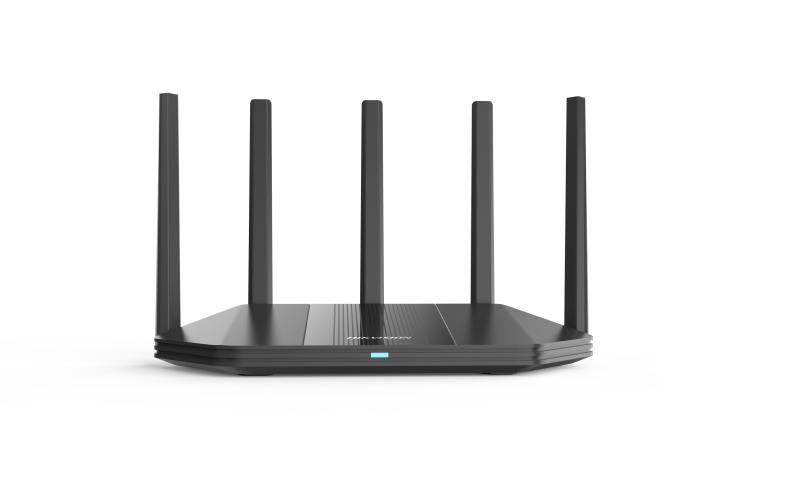
Product description
The manufacturer lists this Network Interface specification for Hikvision DS-3WR30X: 1 × 10/100/1000 Mbps Adaptive WAN Port 3 × 10/100/1000 Mbps Adaptive LAN Ports. Plan connections for this exact model. Distinguish endpoint and upstream connections rather than counting ports with different speeds and roles as equivalent links.
Listed Wireless Standard: IEEE 802.11a/n/ac/ax @5GHz IEEE 802.11b/g/n/ax @2.4GHz. Retain the scope of this specification; aggregate switching capacity, per-port link speed and achieved end-to-end throughput are different measurements. Plan network load alongside protocol and connection conditions.
Installation specification for Working Temperature: 0 ℃ to 40 ℃ (32 ℉ to 104 ℉). Evaluate the operating environment and enclosure requirements against these limits. Plan cabling, power and connection protection using the installation documentation.
Technical Specifications
| Net Weight | 0.40 kg |
|---|---|
| Gross Weight | 0.790 kg |
| Packing List | 3000Mbps Wi-Fi6 Router x 1 Power Supply Adaptor × 1 CAT5e Network Cable × 1 Quick Start Guide × 1 Regulatory Compliance and Safety Information × 1 Product Flyer×1 |
| Packing Method | Single pack |
| Storage humidity | 5% to 95% RH non-condensing |
| Working Humidity | 10% to 90% RH non-condensing |
| Installation Mode | Desk-Mounted,Wall-Mounted |
| Storage temperature | -40 ℃ to 70 ℃ (-40 ℉ to 158 ℉) |
| Working Temperature | 0 ℃ to 40 ℃ (32 ℉ to 104 ℉) |
| Max. Power Consumption | ≤12 W |
| Package Dimensions (W × H × D) | 365 mm × 340 mm × 73 mm |
| Product Dimensions (W × H × D) | 281.7 mm × 145.0 mm × 204.1 mm |
| Available Models | DS-3WR30X DS-3WR30X DS-3WR30X DS-3WR30X |
|---|
| VPN | PPTP Server,L2TP Server,PPTP Client,L2TP Client,OpenVPN Server,OpenVPN Client |
|---|---|
| DDNS | Oray,No-IP,DynDNS |
| DHCP | DHCP Client List DHCP Server |
| MESH | Hikvision Mesh |
| Others | VLAN/IPTV,IGMP,WAN Self-Adaption,Quick Diagnosis,WIFI Optimization,Ping/Tracert |
| Roaming | 802.11k/v |
| Upgrade | Web Upgarde App Cloud Upgrade Auto Upgrade |
| Firewall | Forbid UDP flood attack Forbid TCP SYNC flood attack Forbid ICMP flood attack |
| WAN Mode | DHCP Static IP PPPOE |
| IP Version | IPv4 IPv6 |
| System Log | System log |
| Security Mode | WPA2-PSK,WPA/WPA2-PSK,WPA2-PSK/WPA3-SAE |
| NAT Forwarding | Port Mapping DMZ UPnP |
| Operating Mode | Router Mode Wireless Extender Mode Access Point Mode |
| Parental Control | Speed Limit Internet Access Period Filter URL Parental Control Custom Profiles |
| Management Method | Web Control: PC, mobile App Control: HPP, HC TR069(TR098/TR181) |
| Security Mechanism | Support fast and secure WPS connection Support hiding wireless network name Support controlling terminal network connection Support firewalls Login Authentication |
| RAM | 256MB |
|---|---|
| ROM | 128MB |
| Button | Reset button, WPS/MESH Button |
| LED Indicator | Red/blue for different working states, flashing mode |
| Network Interface | 1 × 10/100/1000 Mbps Adaptive WAN Port 3 × 10/100/1000 Mbps Adaptive LAN Ports |
| Power Supply Method | Power Supply Adapter |
| Power Specifications | DC 12 V, 1 A |
| Antenna | 5 high gain antennas |
|---|---|
| Antenna Gain | 5dbi |
| Wireless Range | Up to 1506 ft²/140 m² (Recommend coverage for home use, actual Wi-Fi range varies depending on the layout and wall materials) |
| Max. Connections | 256 |
| Max. Wi-Fi Speed | ≤ 3000 Mbps 5GHz: 2402Mbps 2.4GHz: 574Mbps |
| Wireless Features | Dual Band Supported MU-MIMO supported Beamforming supported OFDMA supported |
| Wireless Standard | IEEE 802.11a/n/ac/ax @5GHz IEEE 802.11b/g/n/ax @2.4GHz |
| Transmitting Power | CE: <20dBm(2.4GHz) <23dBm(5GHz) |
| Receiving Sensitivity | 5GHz: -89dBm@HE80-MCS0 -60dBm@HE80-MCS11 2.4GHz: -93dBm@HT40-MCS0 -73dBm@HT40-MCS7 |
| Working Frequency Band | 2.4 GHz,5 GHz |
| Recommended Connections | 60 |