
Hikvision DS-3WR12C Wi-Fi Router
Review manufacturer-documented connectivity, capacity and installation information for Hikvision DS-3WR12C. Compare port roles, power requirements and compatibility conditions using this exact model's technical table.
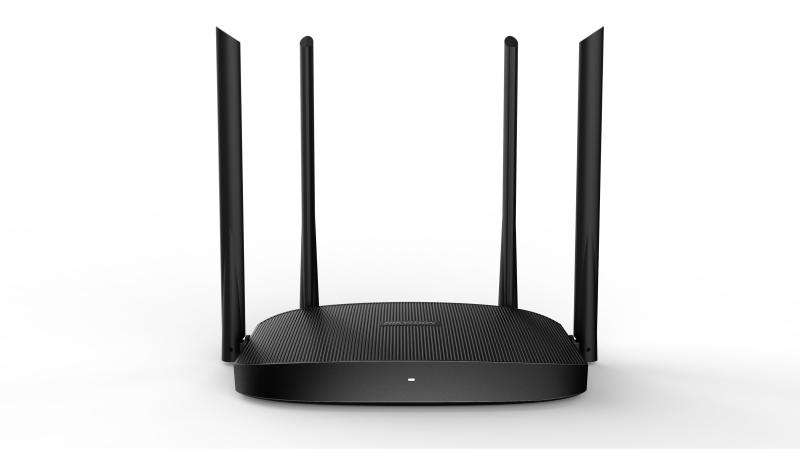
Product description
The manufacturer lists this Network Interface specification for Hikvision DS-3WR12C: 1*10/100Mbps WAN port 3*10/100Mbps LAN ports. Plan connections for this exact model. Distinguish endpoint and upstream connections rather than counting ports with different speeds and roles as equivalent links.
Listed Data Rate: ≤ 1167 Mbps 2.4 GHz: 300 Mbps 5 GHz: 867 Mbps. Retain the scope of this specification; aggregate switching capacity, per-port link speed and achieved end-to-end throughput are different measurements. Plan network load alongside protocol and connection conditions.
Installation specification for Working Temperature: 0 ℃ to 40 ℃ (32 ℉ to 104 ℉). Evaluate the operating environment and enclosure requirements against these limits. Plan cabling, power and connection protection using the installation documentation.
Technical Specifications
| Net Weight | 0.222 kg (0.489 lb) |
|---|---|
| Gross Weight | 0.722 kg (1.592 lb) |
| Packing List | Wireless Router x 1, Ethernet cable × 1, Quick installation guide × 1 |
| Packing Method | Single pack |
| Storage humidity | 5% to 90% RH non-condensing |
| Working Humidity | 10% to 90% RH non-condensing |
| Installation Mode | Desktop installation |
| Storage temperature | -40 ℃ to 70 ℃ (-40 ℉ to 158 ℉) |
| Working Temperature | 0 ℃ to 40 ℃ (32 ℉ to 104 ℉) |
| Max. Power Consumption | ≤ 9 W |
| Package Dimension (W × H × D) | 306 mm × 290 mm × 59 mm (12.05"× 11.42"× 2.32") |
| Product Dimension (W × H × D) | 248.40 mm × 154.80 mm × 213.34 mm (9.78"× 6.09"× 8.40") |
| Available Models | DS-3WR12C DS-3WR12C DS-3WR12C DS-3WR12C |
|---|
| Upgrade | Web Update and Upgrade |
|---|---|
| WAN Mode | DHCP,Static IP,PPPoE |
| System Log | System log |
| Security Mode | WPA-PSK, WPA2-PSK, WPA and WPA2 supported |
| Management Method | Web |
| Security Mechanism | Hide SSID |
| Application function | Wireless Router Mode, Wireless Repeater Mode, Client + AP, WISP, and AP Mode supported DHCP Server supported Guest Network Configuration supported Signal Adjustment supported WiFi Schedule supported |
| Reset | Reset button |
|---|---|
| LED Indicator | LED indicator |
| Network Interface | 1*10/100Mbps WAN port 3*10/100Mbps LAN ports |
| Power Supply Method | 9 VDC, 1 A power adapter power supply |
| Power Specifications | 9 VDC, 1 A |
| Antenna | 4 high gain antennas |
|---|---|
| Data Rate | ≤ 1167 Mbps 2.4 GHz: 300 Mbps 5 GHz: 867 Mbps |
| EIRP Power(Max.) | 2.4 GHz: 19.86 dBm 5 GHz: 22.96 dBm |
| Wireless Standard | IEEE 802.11/a/n/ac wave 2 @5GHz, IEEE 802.11b/g/n @2.4GHz |
| Transmitting Power | CE: <20 dBm(2.4G) <23 dBm(5G) |
| Operating Frequency | 2.4 GHz: US/2412-2472 MHz(CH1-CH13) 5 GHz: US/5180-5240 MHz(CH36-CH48) 5 GHz: US/5740-5805 MHz(CH149-CH161) |
| Wireless Performance | 4 × 4 MU-MIMO supported Beamforming supported |
| Receiving Sensitivity | 58 ± 2 dB@AC80 -MCS9 84 ± 2 dB@AC80 -MCS0 |
| Working Frequency Band | 2.4 GHz,5 GHz |