
Hikvision DS-3WF15KS-SI-5ACG/H Wireless Bridge
Review manufacturer-documented connectivity, capacity and installation information for Hikvision DS-3WF15KS-SI-5ACG/H. Compare port roles, power requirements and compatibility conditions using this exact model's technical table.
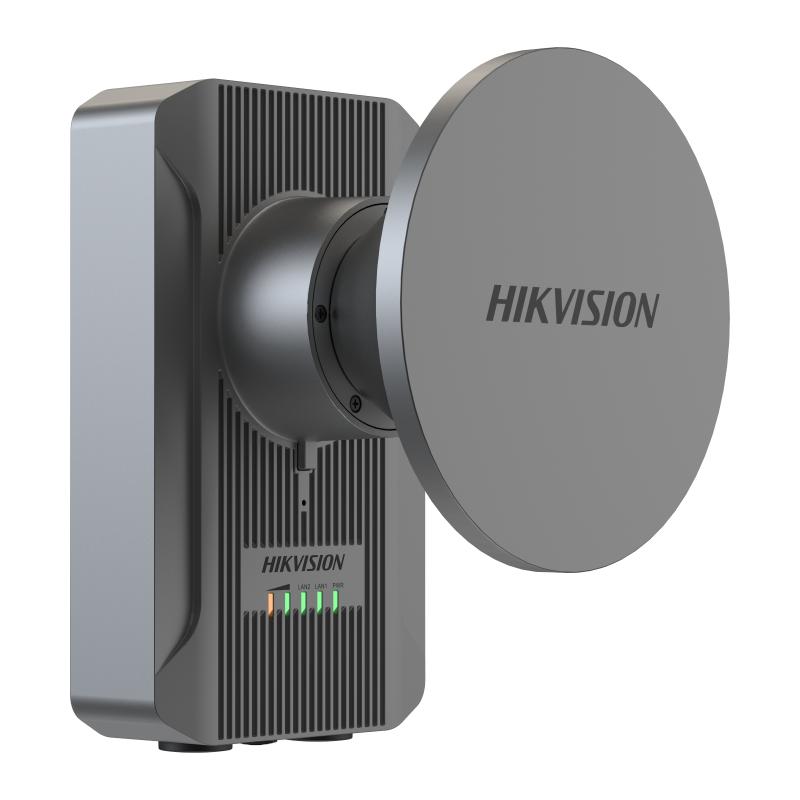
Product description
The manufacturer lists this Max. Transmission Rate of Air Interface specification for Hikvision DS-3WF15KS-SI-5ACG/H: ≤ 867 Mbps. Plan connections for this exact model. Distinguish endpoint and upstream connections rather than counting ports with different speeds and roles as equivalent links.
Listed Wireless Standard: IEEE 802.11/a/n/ac. Retain the scope of this specification; aggregate switching capacity, per-port link speed and achieved end-to-end throughput are different measurements. Plan network load alongside protocol and connection conditions.
The manufacturer specifies this PoE PoE Port: LAN1 passive PoE IN. Distinguish PoE ports from total ports and each port's limit from the device's aggregate power budget. Check powered-device classes and cable conditions against this exact model's technical table.
Installation specification for Working Temperature: -40 °C to 70 °C (-40 °F to 158 °F) Note: The actual operating temperature range of the entire device depends on the power adapter. The default adapter supports a maximum of 65°C (149°F). To achieve the full 70°C (158°F) operating range, an optional industrial-grade power adapter must be used.. Evaluate the operating environment and enclosure requirements against these limits. Plan cabling, power and connection protection using the installation documentation.
Technical Specifications
| Net Weight | 1.6 kg (3.52 lb) per device |
|---|---|
| Gross Weight | 4.2 kg (9.24 lb) |
| Packing List | Wireless Bridge × 1,PoE Power Supply × 1,AC Cord × 1,Quick Start Guide ×1,Regulatory Compliance and Safety Information × 1,Antenna x 1,Waterproof plug x 3,Mounting bracket x 1 |
| ESD Protection | ±15 kV(Air) / ±8 kV(Contact) |
| Packing Method | Single unit packing |
| Storage humidity | 5% to 95% (no condensation) |
| Surge Protection | 6 kV |
| Working Humidity | 5% to 95% (no condensation) |
| Installation Mode | Pole Mounting |
| Power Consumption | 4 W for typical (1-ch 2MP IPC), Max. 7 W |
| Ingress Protection | IP68 |
| Storage temperature | -40 °C to 80 °C (-40 °F to 176 °F) |
| Working Temperature | -40 °C to 70 °C (-40 °F to 158 °F) Note: The actual operating temperature range of the entire device depends on the power adapter. The default adapter supports a maximum of 65°C (149°F). To achieve the full 70°C (158°F) operating range, an optional industrial-grade power adapter must be used. |
| Package Dimensions (W × H × D) | 392 mm × 392 mm × 155 mm (15.43" × 15.43" × 6.10") |
| Product Dimensions (W × H × D) | 134mm × 224.09 mm × 96.58 mm(without antenna) |
| EMC | CE-EMC(EN 55032, EN 61000-3-3, EN IEC 61000-3-2, EN 50130-4, EN 55035) |
|---|---|
| Radio | EN 301 893,EN 300 440,EN 301 489-3,EN 301 489-17,EN 301 489-1, EN 61000-3-3, EN IEC 61000-3-2, EN IEC 62311 |
| Safety | CB (IEC 62368-1),CE-LVD (EN 62368-1) |
| Chemistry | CE-RoHS (2011/65/EU),WEEE (2012/19/EU),Reach (Regulation (EC) No.1907/2006) |
| PoE Port | LAN1 passive PoE IN |
|---|---|
| PoE Distance | 100 m |
| HPP | Support one-click activation and remote management via Hik-Partner Pro. Functions supported: 1. Reboot device 2. Restore device 3. Display the topology information 4. Display the connection status between AP and CPEs, including signal intensity, background noise, sending & receiving rate 5. Configure wireless settings, including working mode, SSID, password, channel, channel bandwidth, transmitting power 6. Bridge alignment 7. Spectrum scanning |
|---|---|
| Upgrade | Web,iVMS-4200,HCP,HPP |
| System Log | Syslog,Control center information |
| Channel Width | 20/40/80 MHz |
| Security Mode | WPA2-PSK |
| Network Protocol | NTP (network time synchronization),SADP (auto search for IP address), HTTPS/HTTP (web management),SSH (debugging) |
| Channel Selection | Auto/manual selection |
| Management Method | HCP,Web,iVMS-4200,HPP |
| Security Mechanism | Wireless network name hidden |
| Application Function | IFM,IPM,DFS,TPC |
| Reset | Hardware resetting button |
|---|---|
| Power Supply | 24 V Passive PoE/9~36 V DC;Check the physical interface image below for more details. |
| LED Indicator | Power indicator,LAN indicator,Signal intensity indicator |
| Network Interface | 2 × 10/100/1000 Mbps RJ45 ports |
| RF Design | The band-pass filters are used to remove unwanted frequencies from the singal. |
|---|---|
| Antenna Gain | 15 dBi |
| Antenna Angle | (H) Beamwidth [3 dB] 30° (V) Beamwidth [3 dB] 30° |
| Throughput Rate | PTP:300 Mbps/5 KM(AC80), 180 Mbps/10 KM(AC80), 110 Mbps/15 KM(AC80); PTMP(1 to 8): 110 Mbps/5KM(AC80) |
| Wireless Standard | IEEE 802.11/a/n/ac |
| Transmitting Power | 29 dBm @11ac 80MHz MCS0 (Note: Transmitting power may vary with local regulations.) |
| Receiving Sensitivity | -88 ±2dBm@AC80-MCS0 |
| Working Frequency Band | 5150 MHz ~ 5250 MHz,5250 MHz~ 5350 MHz,5470 MHz~ 5725 MHz,5725 MHz~ 5825 MHz,(Note: Available channel may vary with local regulations.) |
| Max. Transmission Rate of Air Interface | ≤ 867 Mbps |