
Hikvision DS-3T1528HP-SI-24P4F Network Switch
Review manufacturer-documented connectivity, capacity and installation information for Hikvision DS-3T1528HP-SI-24P4F. Compare port roles, power requirements and compatibility conditions using this exact model's technical table.
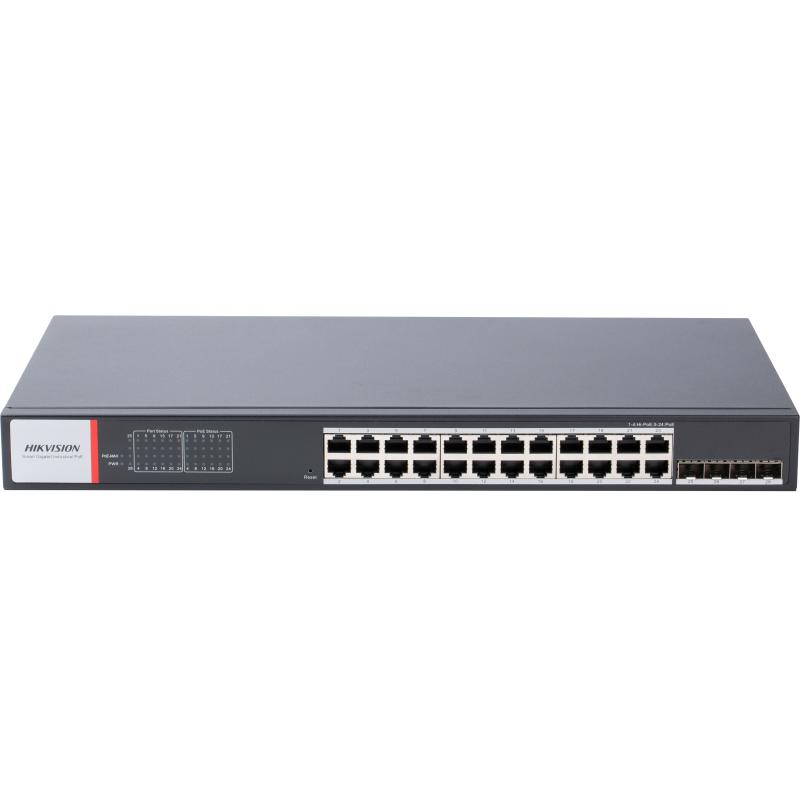
Product description
The manufacturer lists this Ports specification for Hikvision DS-3T1528HP-SI-24P4F: 24 × Gigabit PoE port,4 × Gigabit fiber optical port. Plan connections for this exact model. Distinguish endpoint and upstream connections rather than counting ports with different speeds and roles as equivalent links.
Listed MAC Address Table: 8 K. Retain the scope of this specification; aggregate switching capacity, per-port link speed and achieved end-to-end throughput are different measurements. Plan network load alongside protocol and connection conditions.
The manufacturer specifies this PoE PoE Standard: Ports 1 to 4: IEEE 802.3af, IEEE 802.3at, IEEE 802.3bt Ports 5 to 24: IEEE 802.3af, IEEE 802.3at. Distinguish PoE ports from total ports and each port's limit from the device's aggregate power budget. Check powered-device classes and cable conditions against this exact model's technical table.
Installation specification for Operating Temperature: -40 °C to 75 °C (-40 °F to 167 °F). Evaluate the operating environment and enclosure requirements against these limits. Plan cabling, power and connection protection using the installation documentation.
Technical Specifications
| Shell | Metal material, IP40 |
|---|---|
| Net Weight | 3.23 kg (7.13 lb) |
| Gross Weight | 4.00 kg (8.82 lb) |
| Power Supply | 48-57 V DC, 12 A 52 V~57 V recommended input voltage to ensure stable power supply. Support dual power inputs and hot backup. |
| Surge Protection | 6 kV |
| Installation Mode | Desk-Mounted,Rack (equipped with mounting ears) |
| Relative Humidity | 5% to 95% (no condensation) |
| Operating humidity | 5% to 95% (no condensation) |
| Storage temperature | -40 °C to 85 °C (-40 °F to 185 °F) |
| Operating Temperature | -40 °C to 75 °C (-40 °F to 167 °F) |
| Max. Power Consumption | 500 W |
| Dimensions (W × H × D) | 440 mm × 44 mm × 220.8 mm (17.32'' × 1.73'' × 8.69'') |
| Power Consumption in Idle | 20 W |
| EMC | CE-EMC (EN 55032: 2015+A11: 2020, EN IEC 61000-3-2: 2019, EN 61000-3-3: 2013+A1: 2019, EN 50130-4: 2011+A1: 2014, EN 55035: 2017+A11: 2020),IC (ICES-003: Issue 7:2020),RCM (AS/NZS CISPR 32: 2015) |
|---|---|
| Safety | CB (AMD1:2009, AMD2:2013, IEC 62368-1: 2014 (Second Edition)), CE-LVD (EN 62368-1: 2014+A11: 2017) |
| Chemistry | CE-RoHS (2011/65/EU),WEEE (2012/19/EU),Reach (Regulation (EC) No.1907/2006) |
| PoE Port | Hi-PoE: Ports 1 to 4 PoE: Ports 5 to 24 |
|---|---|
| PoE Standard | Ports 1 to 4: IEEE 802.3af, IEEE 802.3at, IEEE 802.3bt Ports 5 to 24: IEEE 802.3af, IEEE 802.3at |
| Perpetual PoE | Supported |
| PoE Power Pin | Ports 1 to 4: 8-pin power: 1/2(-), 3/6(+), 4/5(+), 7/8(-) Ports 5 to 24: End-span: 1/2(-), 3/6(+) |
| Max. Port Power | Ports 1 to 4: 90 W Ports 5 to 24: 30 W |
| PoE Power Budget | 480 W |
| ACL | Support ACL definitions based on source/destination MAC address, source/destination IP address, IP protocol type. Support ACL application on ports. Support IPv4 ACL and MAC ACL configurations. Support inbound ACLs. |
|---|---|
| HPP | Support one-click activation and remote management via Hik-Partner Pro. Functions supported: 1. Display the port rate. 2. Display the port bandwidth utilization rate. 3. Display the PoE power usage. 4. Display topology information. 5. Display the alarm status. 6. Restart ports and devices. 7. Enable port long-rage mode. 8. Remotely upgrade the device. |
| QoS | QoS is used to allocate bandwidth to different services so as to provide end-to-end service quality assurance. Support port-based priority configuration. Support SP, WRR priority schedule mode. |
| IPSG | IPSG can control the security of port access device. Support port, MAC, IP binding. Support 256 security entries. |
| VLAN | VLAN is used for network scale planning and network health improvement. Support 802.1Q. Configurable VLAN ID from 1-4094. Support Trunk, Access port mode. Support Max. 4094 VLAN. |
| Long Range | Ports 1 to 24: up to 300 m. Long range performance may vary depend on camera model or cable condition. |
| PoE Watchdog | Ports 1 to 24: auto detect and restart the cameras that do not respond. |
| DHCP Snooping | DHCP Snooping can prevent unauthorized connections to DHCP servers from disrupting the network and affecting normal network communication, and only allow DHCP packets from trusted ports to pass through. Disabled by default. |
| Storm Control | Storm control is used to prevent switch ports from being blocked by broadcast or multicast storms in the LAN, which may affect network communication. Support port rate limiting based on broadcast, multicast, and unknown unicast packets. |
| Port Isolation | Ports 1 to 24: port isolation mode to improve network security Ports in an isolation group cannot communicate with each other, but they can communicate with ports outside the isolation group. |
| Loop Prevention | Loop prevention is used to prevent the switching network from forming loops, which will seriously affect network communication. Disabled by default. Support 802.1D STP. Support 802.1w RSTP. Support G.8032 ERPS. |
| Link Aggregation | Link aggregation is used to aggregate multiple physical ports to form a logical port for load balancing, bandwidth expansion, and port protection. Support static link aggregation. Support 8 aggregation groups. |
| Port Rate-Limiting | Port rate-limiting is used for port bandwidth adjustment to prevent network congestion. |
| System Maintenance | Support device management via web. Support DHCP Client. Enabled by default for dynamic assignment of management IP addresses. Support Super IP, which is a fixed IP address (10.180.190.200) for direct access. Support management via Hik-Central Pro. Support remote management via Hik-Partner Pro. Support cable detection. Abnormal open circuits and short circuits as well as network cable length can be detected. Support 802.1ab LLDP for peer device discovery. Support SNMP v1/v2c/v3 for third-party management platform access. Support port mirroring for fault locating. |
| Ports | 24 × Gigabit PoE port,4 × Gigabit fiber optical port |
|---|---|
| Internal Cache | 4.1 Mbits |
| MAC Address Table | 8 K |
| Switching Capacity | Whole-Device Performance: 56 Gbps Port Performance: 56 Gbps |
| Packet Forwarding Rate | Whole-Device Performance: 41.66 Mpps Port Performance: 41.66 Mpps |