
Are Budget-Friendly Smartphones a Security Risk for Corporate Networks?
Employees using personal phones for work can reduce costs. However, devices with expired software support, unverified reliability, or non-compliance with corporate security policies can pose significant risks. Are budget-friendly phones truly less secure? We examine BYOD, mobile device management, and corporate access security from a technical perspective.
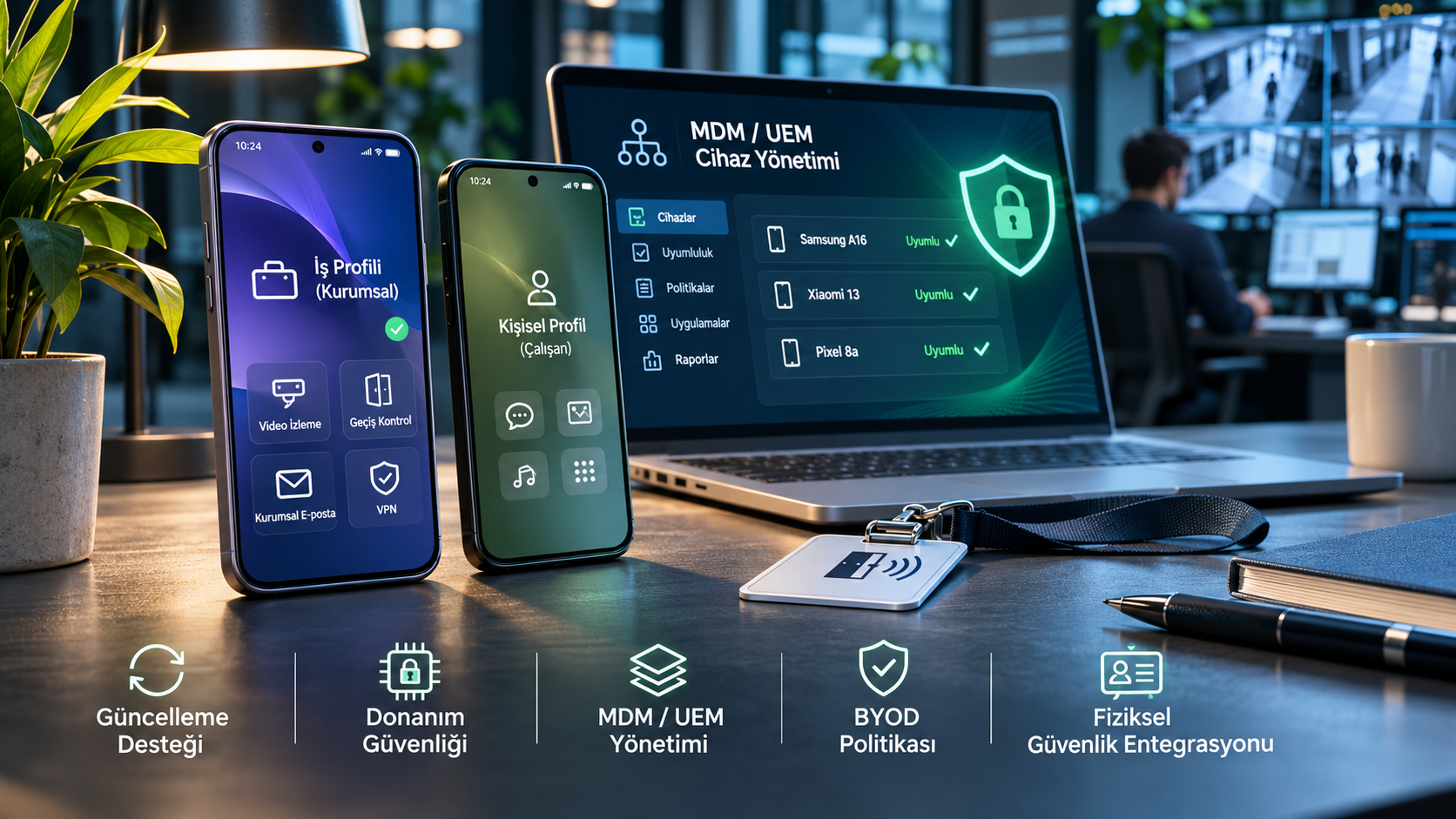
Is the price of a smartphone sufficient to determine its security for corporate networks?
The BYOD (Bring Your Own Device) model, which allows employees to use their own phones in business processes, provides flexibility to businesses. It may no longer be necessary to provide a separate phone to each employee for accessing corporate emails, managing field teams' work orders, remotely monitoring security cameras, or using mobile access control systems.
However, a personal device accessing corporate systems also changes the security boundaries of the business.
Especially when budget-friendly smartphones are considered, software update support, device integrity, hardware protections, and central management compatibility must be carefully evaluated.
There's an important distinction here: A low price alone is not a security vulnerability. The real risk is the inability of the organization to adequately manage the device's security features and lifecycle.
What is BYOD and why is it important for companies?
BYOD refers to employees accessing corporate applications and data with their own phones, tablets, or other suitable devices.
This model can offer various advantages, especially for hybrid workforces, field operations, maintenance personnel, and businesses using mobile security applications.
Allowing employees to use devices they are accustomed to can reduce the need for additional hardware. However, enforcing security policies on a device not directly owned by the organization presents different challenges compared to company-managed devices.
The U.S. National Institute of Standards and Technology (NIST), in its SP 800-124 Rev. 2 guidance, does not limit mobile device security solely to the device purchase or software installation phase. It addresses the management of the entire lifecycle, from device onboarding to usage, monitoring, and decommissioning.
This approach forms an important foundation for BYOD: A phone's security depends not only on its initial technical specifications but also on how it is protected in subsequent years.
1. Software Update Support: One of the Most Important Purchase Criteria
One of the first elements to consider when assessing a smartphone's security risk is the update support provided by the manufacturer.
New security vulnerabilities can be discovered over time in mobile operating systems and device components. Manufacturers release security patches to close these vulnerabilities.
However, even if a device's operating system appears current, its security patch date might be old. Furthermore, an operating system upgrade is not the same concept as a security update.
For corporate use, the following information should be examined separately:
The device's current Android or iOS version.
The date of the last security patch.
The manufacturer's guaranteed security support end date.
The frequency of update releases.
Support differences based on device model and region.
Do Budget-Friendly Phones Really Receive Shorter Support?
Not always.
For example, Samsung announced up to six generations of operating system upgrades and six years of security update support for the Galaxy A16.
This example contradicts the common assumption that all affordable devices have a short software lifespan.
On the other hand, not every model offers the same support. In fact, update policies can vary significantly across different product series from the same manufacturer.
Therefore, in corporate device evaluation, the manufacturer's model-specific update commitment should be considered instead of the price segment.
Why is a Phone with Expired Support Risky?
Devices that do not receive security updates may remain vulnerable to certain security flaws discovered later.
This does not necessarily mean the device will be compromised. However, it can limit the measures a business can take against such vulnerabilities.
Especially for devices using corporate email, file sharing, VPN, or management applications, the end of update support is a significant reason to re-evaluate the access policy.
2. Hardware Security: Are There Necessarily Deficiencies in Inexpensive Devices?
Data protection on smartphones does not solely depend on application passwords.
Modern mobile platforms use various mechanisms for storage encryption, secure boot, operating system isolation, and the protection of cryptographic keys.
On the Android platform, hardware-backed Keystore can enable certain cryptographic operations to be performed via trusted execution environments. Supported devices may also include components offering higher isolation, such as StrongBox.
However, not all models have the same security architecture or hardware features.
Here, it's important to avoid a false generalization: It is not accurate to say that most budget-friendly Android phones lack hardware-based encryption.
Google's Android Enterprise Recommended requirements cover default encryption and specific operating system security features for supported device categories.
The issue to be examined in corporate evaluation is not whether the device is expensive, but whether it truly supports the required security features.
Which Protections Become Important if a Device is Stolen?
In case of a lost or stolen phone, screen lock, device encryption, corporate account sessions, and remote access management become important.
For example, it may be necessary to terminate corporate application sessions on the lost device, revoke mobile access credentials, and remove company data according to management policies.
Therefore, purchase evaluation should not be based solely on processor or RAM capacity.
3. MDM and UEM: How Should Personal Phones Be Managed?
Mobile Device Management (MDM) and Unified Endpoint Management (UEM) solutions help organizations centrally manage security and compliance policies for mobile devices.
These solutions can provide functions such as application configuration, auditing of security conditions, corporate account management, and access restrictions, depending on the product and management model.
In BYOD environments, employee personal privacy is also of particular importance.
What Does an Android Work Profile Do?
Android Enterprise allows corporate applications and data to be kept in a separate work profile on personal devices.
This approach allows the organization to manage applications and data within the work profile, while the employee continues to use their personal applications.
According to Google's documentation, in appropriate BYOD configurations, the organization's management authority is limited to the work profile; the personal profile remains separate.
However, using a work profile does not mean that all security risks are eliminated.
Phishing, account compromise, update deficiencies, and incorrect access permissions must still be evaluated.
Does Lower RAM Capacity Compromise MDM Security?
Some Android manufacturers' battery saving and background application management policies can affect the operational behavior of applications.
However, the claim that every phone with low RAM capacity silently disables MDM software or exits security control cannot be generalized.
The correct approach is to test the chosen MDM/UEM solution on supported devices and not base access decisions solely on the status of an application running on the phone.
Corporate access systems should be able to re-evaluate a device's compliance status when necessary and restrict access to sensitive resources for non-compliant devices.
4. Supply Chain Security: Can We Trust the Software on the Phone?
One of the significant risks in smartphone security is that the device may have been tampered with a system component containing malicious software before reaching the user.
This risk is not theoretical.
Cybersecurity company Kaspersky announced in April 2025 that it had detected the Triada malware pre-installed in the system software of some counterfeit Android smartphones.
The research addressed the malware's capabilities to compromise messaging accounts, monitor application activities, and perform various fraudulent operations.
In the Keenadu research published in February 2026, it was reported that malware could be found on some Android devices via firmware, system applications, or application distribution channels.
These cases highlight an important distinction.
The problem is not all phones within a certain price range; it is unverified hardware, modified software, and unmonitored supply chain processes.
What Measures Should Be Taken in Corporate Procurement?
When procuring mobile devices, businesses should evaluate authorized sales channels, the manufacturer's device verification mechanisms, security update history, and management compatibility.
Access to sensitive corporate resources should not be granted to devices with unknown origins, modified operating systems, or those that cannot undergo security verification.
Google's Android Enterprise Recommended device directory is one resource that can be used in Android device selection. However, inclusion in this program alone does not guarantee that all security needs are met.
5. Why Can BYOD Be More Critical in Physical Security Systems?
Corporate mobile security is not limited to protecting emails or office documents.
Today, many physical security applications can be used via mobile devices.
Security personnel can monitor camera feeds from a mobile application, authorized managers can evaluate alarm notifications, or employees can use their phones as digital access credentials.
In these systems, the phone is not just a communication tool, but also an access point to the physical security infrastructure.
For example, consider a facility manager whose phone has both remote video monitoring and mobile access control permissions.
In the event of the device or associated accounts being compromised, the risk can range from unauthorized access to video feeds to the misuse of physical access credentials, depending on the permissions held and the security design of the systems.
Therefore, strong authentication, granular authorization, transaction logs, and permission revocation processes are important in the mobile applications of security systems.
Preventing users from accessing camera, door, or management functions they do not need can help limit the impact of a potential incident.
For more information on the operation of mobile access technologies, GüvenlikOnline's Mobile Access System article can be reviewed.
6. How to Create a BYOD Security Policy?
An effective BYOD policy should define what security conditions devices must meet, rather than focusing on which phone brand employees use.
The following control headings can be used as a starting point:
1. Define supported devices. Establish acceptance conditions for operating system version, security update date, and manufacturer support.
2. Evaluate device integrity. Restrict access on devices that do not have a reliable software structure, whose integrity cannot be verified, or that have been unauthorizedly modified.
3. Separate corporate data. Ensure the separation of business data from personal applications with appropriate Android work profiles or platform-specific management solutions.
4. Use strong authentication. Evaluate phishing-resistant multi-factor authentication methods, especially for sensitive systems.
5. Limit access based on need. Implement role-based authorization instead of granting every employee access to all corporate systems.
6. Monitor device compliance. Regularly evaluate device security conditions through MDM/UEM and identity management solutions.
7. Prepare for lost and stolen scenarios. Create processes for terminating account sessions, revoking access credentials, and protecting corporate data.
8. Protect employee privacy. Clearly define what information will be managed, what operations can be performed, and how personal data will be protected in BYOD policies.
9. Track support end dates. Create a schedule for re-evaluating devices whose security updates have ended.
10. Test policies in field conditions. Verify that corporate Wi-Fi, VPN, mobile security applications, and remote access scenarios work as expected on real devices.
The primary goal here is not to make all employees purchase the most expensive devices, but to sustainably implement security conditions appropriate to the organization's risk level.
7. How to Choose an Affordable Phone for Corporate Use?
A company making decisions based solely on price, despite a low initial purchase cost, may incur additional management and device replacement expenses in the future.
For example, a phone whose security update support will soon end, while appearing affordable, may not be advantageous in terms of corporate lifespan.
Conversely, a model documented to be supported for a long time and compatible with the organization's management solution, despite a higher initial price, could be a more sustainable option.
During selection, the following questions should be answered:
Does the manufacturer state how long it will provide security updates for the device?
Is the device compatible with the organization's MDM/UEM solution?
Are the necessary work profile, encryption, and secure authentication features supported?
Can the device be obtained from a reliable supply channel?
Is there a plan for how the device will be replaced when its support period ends?
The Android Enterprise Recommended program and manufacturers' official support pages can be starting points for this evaluation.
However, the final decision should be made in line with the organization's applications and data security needs.
Frequently Asked Questions
Are Budget-Friendly Smartphones Insecure for Corporate Networks?
No. A device being low-priced does not solely mean it is insecure. Update support, security features, supply source, and corporate management compatibility should be evaluated together.
Does BYOD Implementation Lead to Data Leaks?
BYOD alone does not mean data leakage. However, incorrect access permissions, compromised accounts, or inadequate device security can increase the likelihood of corporate data being exposed to unauthorized access.
Are Android Enterprise Recommended Devices Completely Secure?
No. The program indicates that devices meet certain corporate requirements. Security updates, access policies, application management, and user behavior are also important.
Can Companies Remotely Wipe Employees' Personal Phones?
This depends on who owns the device, the management model used, and the capabilities of the respective solution. In appropriate BYOD work profile configurations, it may be possible to remove the corporate profile. The authority to wipe the entire device should be distinguished from the process of removing only business data.
Is Using MDM Sufficient for Corporate Security?
MDM is an important management layer but is not sufficient on its own. It should be evaluated in conjunction with authentication, access management, software updates, incident monitoring, and employee awareness.
Conclusion: The Risk is Not in the Phone's Price, But in Security Management
The evaluation of budget-friendly smartphones for corporate use should not be limited to merely comparing the technical hardware of devices.
Reliable manufacturer support, up-to-date software, appropriate encryption, central management, and correct access policies are more decisive factors.
For a business, the fundamental question is not whether employees use expensive or inexpensive phones, but under what conditions these devices can access corporate systems and how this access is controlled.
The approach that makes the BYOD model secure is not to ban all devices, but to clearly define access conditions and to maintain these conditions throughout the devices' lifespan.
References
NIST — Guidelines for Managing the Security of Mobile Devices in the Enterprise (SP 800-124 Rev. 2), May 17, 2023. Corporate mobile device security, BYOD, and lifecycle management.
Google — Android Enterprise Recommended Device Requirements. Device eligibility, encryption, and software support conditions.
Google — Android Enterprise Overview. BYOD work profiles and personal/corporate data separation.
Android Open Source Project — Hardware-backed Keystore. Hardware-backed cryptographic security architecture.
Samsung Turkey — Galaxy A16. Operating system and security update support.
Kaspersky — Detection of Triada on Counterfeit Android Phones, April 3, 2025.
Kaspersky — Keenadu Android Malware Research, February 17, 2026.
Google — Android Enterprise Recommended Device Directory. Evaluation of supported devices and manufacturer information.